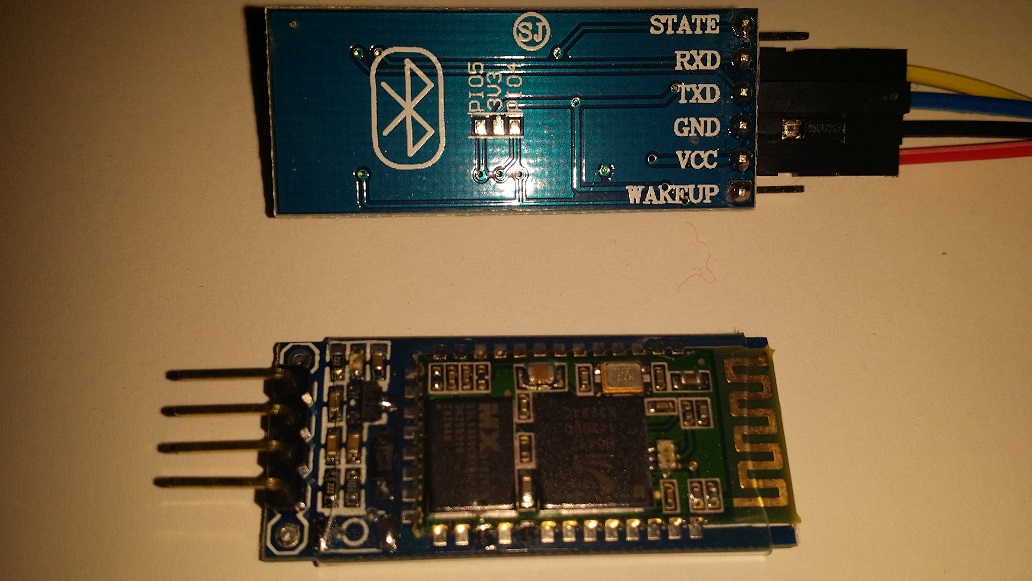
This is a simple starter tutorial to work with a Bluetooth module (HC-05 or HC-06) using the PIC32BLUE Android application (you can use PIC32BLUE+ and/or PIC32BTN apps instead too depending on which example code you are using that is attached below).
Materials used:
1) One Microcontroller (PIC32MX250F128B)
2) One Bluetooth module
3) Four jumper wires (male to female)
4) Power source (10,000 mAh power bank battery pack 5volts)
5) Android phone/tablet with PIC32BLUE installed (device must have Bluetooth capability)
Important note, the Bluetooth module power source and inputs should be at 3.3 volts only. VCC on the Bluetooth module should be connected to 3.3 volts and GND should be connected to ground seen in the photo.
The power bank is optional and can be switched out with power source and the jumper wire connection style may vary depending on the connectors available on your microcontroller board to make the necessary connections.
Connections between the microcontroller pins to the stepper motor PCB are as follows:
Bluetooth Module <----to----> PIC32 Microcontroller Pin
RXD <--------------wire------------> TX
TXD <--------------wire------------> RX
Note: RX means receive and TX means transmit, so the Bluetooth module will transmit to the microcontrollers receive pin and vice versa.
Note2: You may want to change the code attached in this post to use a different serial port, so you will want to replace the word “Serial” in the code to either Serial0 or Serial1, etc according to the pins you would like to connect to.
A quick and easy way of replacing all of the ‘Serial’ words with a few quick steps is the following:
When in MPIDE with the code sketch opened, hold down the “ctrl” (control) key on your keyboard then press the “F” key, a pop-up will show, you can then type the word Serial inside the “Find:” section and type the word Serial0 (or whichever one you wanted to use) into the “Replace with:” section, once both sections have what you wanted to change click on the “Replace All” button and all the changes have been made throughout the code example.
The connections will vary according to the microcontroller board you are using so be sure to check your datasheet or board’s manual for pinouts to ensure you are connecting to the correct pins. You can also navigate to where you have the MPIDE folder installed on your computer then follow the following file path below to see all of the available board folders then select the folder for your current board and reference the Board_Defs.h file, scrolling down in that file until you see the “Serial Port Declarations”. Note: as soon as the softwareSerial library is added into MPIDE I will be sure to update this post with an example using softwareSerial for an easier connection/wiring example with consistent pin number connections between board selections.
Windows file path example below once inside the MPIDE folder on your computer:
***\hardware\pic32\variants\...
For using the DP32 board settings I used the following connections and changed the provided code to use Serial0 :
Bluetooth Module <----to----> PIC32 Microcontroller Pin
RXD <--------------wire------------> 14
TXD <--------------wire------------> 6
Five different code examples attached below. Be sure to read through them and choose which one fits your needs the best. They are listed as the easiest first to the hardest last.
Materials used:
1) One Microcontroller (PIC32MX250F128B)
2) One Bluetooth module
3) Four jumper wires (male to female)
4) Power source (10,000 mAh power bank battery pack 5volts)
5) Android phone/tablet with PIC32BLUE installed (device must have Bluetooth capability)
Important note, the Bluetooth module power source and inputs should be at 3.3 volts only. VCC on the Bluetooth module should be connected to 3.3 volts and GND should be connected to ground seen in the photo.
The power bank is optional and can be switched out with power source and the jumper wire connection style may vary depending on the connectors available on your microcontroller board to make the necessary connections.
Connections between the microcontroller pins to the stepper motor PCB are as follows:
Bluetooth Module <----to----> PIC32 Microcontroller Pin
RXD <--------------wire------------> TX
TXD <--------------wire------------> RX
Note: RX means receive and TX means transmit, so the Bluetooth module will transmit to the microcontrollers receive pin and vice versa.
Note2: You may want to change the code attached in this post to use a different serial port, so you will want to replace the word “Serial” in the code to either Serial0 or Serial1, etc according to the pins you would like to connect to.
A quick and easy way of replacing all of the ‘Serial’ words with a few quick steps is the following:
When in MPIDE with the code sketch opened, hold down the “ctrl” (control) key on your keyboard then press the “F” key, a pop-up will show, you can then type the word Serial inside the “Find:” section and type the word Serial0 (or whichever one you wanted to use) into the “Replace with:” section, once both sections have what you wanted to change click on the “Replace All” button and all the changes have been made throughout the code example.
The connections will vary according to the microcontroller board you are using so be sure to check your datasheet or board’s manual for pinouts to ensure you are connecting to the correct pins. You can also navigate to where you have the MPIDE folder installed on your computer then follow the following file path below to see all of the available board folders then select the folder for your current board and reference the Board_Defs.h file, scrolling down in that file until you see the “Serial Port Declarations”. Note: as soon as the softwareSerial library is added into MPIDE I will be sure to update this post with an example using softwareSerial for an easier connection/wiring example with consistent pin number connections between board selections.
Windows file path example below once inside the MPIDE folder on your computer:
***\hardware\pic32\variants\...
For using the DP32 board settings I used the following connections and changed the provided code to use Serial0 :
Bluetooth Module <----to----> PIC32 Microcontroller Pin
RXD <--------------wire------------> 14
TXD <--------------wire------------> 6
Five different code examples attached below. Be sure to read through them and choose which one fits your needs the best. They are listed as the easiest first to the hardest last.

| hc05_or_hc06_simple_echo_with_delay.pde |
| hc05_or_hc06_simple_echo_without_delay.pde |
| hc05_or_hc06_with_delay_toggle_led_simple.pde |
| hc05_or_hc06_delay_toggle_leds.pde |
| hc05_or_hc06_without_delay_toggle_leds.pde |
 RSS Feed